Progress is coming along, I am in the midst of illustrating each scene. I had hoped I had more illustrations ready before I needed to present to Scott, it was enough to give him an idea of what the piece would look like and how it would work. I explained the updated structure (from week 10) and how I updated the code to reflect the new scene additions, and I now needed a set of code to allow for mouse over animations.
It turns out all I need is one new function code. As Scott dictated the code for the PlayHover to me, I was beginning to understand it a little better.
HoverNAME.addEventListener(MouseEvent.MOUSE_OVER, PlayHover);
function PlayHover (e:MouseEvent):void
{
e.currentTarget.gotoAndPlay(2);
}
All I need to do from here (in theory and based on discussion outcome) is to name the instance according to each animation and match it in the code.
Scott was also discussing the term ‘nesting’ in the past, but at the time I confess it went a little over my head. The penny finally dropped today on what it truly meant. I basically have layers ‘nested’ within layers. I now have 3 levels within my interactive narrative and have identified them as follows:
Three overall levels of structure:
Level 1: Scenes – Overall scenes (pages) – 13 in total.
Level 2: Scene elements & animations – (Actions, text, background, artwork layers etc) Some automatically animated, no code required. 11 in total.
Level 3: User interaction – PlayHover actions, where certain elements in the scene react to the cursor moving over them. This level requires code. 15 in total.
I feel I now have a much clearer scope of work to do and have set up a spreadsheet to outline exactly what is required to complete – and colour coded (as above) to help identify which elements are auto-animated, and which are user-activated.
As for the level of interaction – the whole reasoning behind my study – I have tried to emulate the likes of The Very Hungry Bear app in as far as levels of interactivity on a page/scene. approximately 2-3 user-activated interactions occur on each page. In the instance of the image below, the bear moved and the water moved upon tapping the screen.
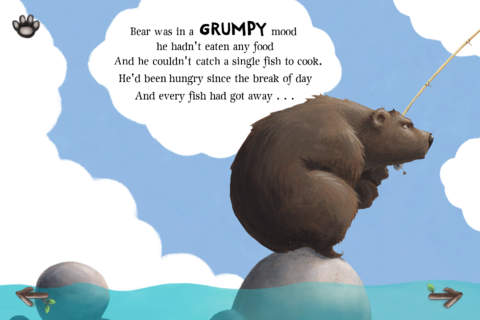
The Very Grumpy Bear App
Reference:
Apple (Australia). 2016. “The Very Hungry Bear on the App Store.” Accessed 11 October 2016. https://itunes.apple.com/au/app/the-very-hungry-bear/id534433413?mt=8.